Website Time Tracker for Chrome
See how much time you really spend on each website. The extension counts only while a tab is in front of you and you are at the computer, takes idle minutes back off and lets you set a daily limit on the sites that eat your day. Your records stay in your browser.
Add to ChromeComing soon to the Chrome Web Store.
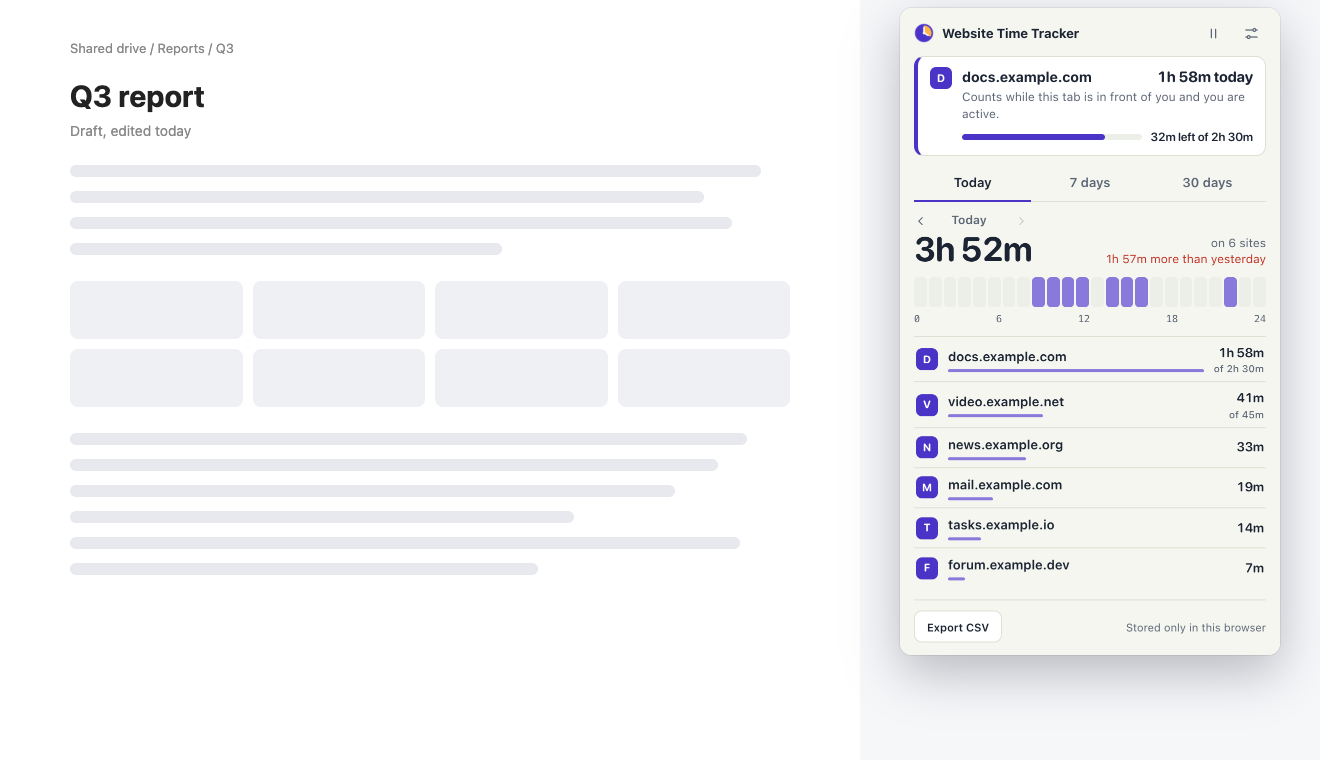
The picture shows sample data.
How it works
- Browse as usualTime is added to the site in the active tab while you use the computer. Background tabs and idle minutes are left out.
- Open the iconSee today by site and by hour, or switch to the last 7 or 30 days. Arrows take you back through earlier days.
- Set a daily limitClick a site in the list and enter minutes per day. When they run out, the tab shows a Time's up page.
What this website time tracker counts
Only the active tab of the Chrome window you are using. When you switch to another app or leave the keyboard for longer than your idle setting, the clock stops, and the idle minutes before Chrome noticed are taken back off. A tab that plays sound keeps counting while you sit still, which you can turn off. Browser pages and files are never counted.
The report puts the biggest time sinks on top and compares the total with the day or period before. A time card shows every hour as a cell, darker for more time, so you can see when the browsing happened, not only how much.
Limits with one fair way out
When a limit runs out you can close the tab, change the limit or take 5 more minutes. The extra minutes are given once a day per site, so opening the same site in another tab does not reset them. Every limit starts over at midnight.
What it does not do
It has no account and no servers, so it does not sync between computers; a backup file moves your records instead. It does not read page content and keeps only site names with seconds per day and hour. It is not a full website blocker: only the sites you give a limit are stopped, and only after the limit is used up.
Questions
Does it count time when I am away from the computer?
No. After the idle time you choose, from 1 to 10 minutes without mouse or keyboard input, the clock stops and those idle minutes are taken back off. A tab that plays sound keeps counting, so a video or a call is not lost; you can turn that off.
Where are my records stored?
Only in Chrome's local storage on your computer. The extension has no servers and sends nothing anywhere. You can export a CSV or save a backup file at any time.
What happens when a daily limit runs out?
The tab switches to a Time's up page where you can close it, take 5 more minutes once a day for that site, or change the limit. Limits reset at midnight.
How the extension and this website handle data: privacy policy.